Mon - Sat: 8:00 AM - 8:00 PM Los Angeles, CA & Surrounding Cities Licensed & Insured CA
contact@primenetworkcabling.com | Fast Dispatch Available
CCTV Troubleshooting

Fix Offline Cameras With Security Camera Repair

We find the real cause of offline cameras, missing footage, and failed recorders, then fix it.

A camera that fails during an incident costs you evidence. Our technicians test the whole chain, from lens to cable to recorder. One repair then solves the problem for good.

  • Diagnostic visit for offline cameras
  • Works on most camera and NVR brands
  • Clear repair or replace advice
Technician mounting a dome security camera on a wall Full signal-chain diagnosis NVR and drive recovery checks

What Security Camera Repair Covers

Most camera failures come from a few causes. A bad cable, a dead PoE port, a full drive, or a new password can take a camera offline.

We test in order. First we check power. Then we check the network link, the camera, and finally the recorder. This method avoids swapping parts that still work.

If a repair costs more than a replacement, we say so. You decide with clear facts in hand.

Common faults
Offline cameras, no recording, blurry or dark video
Tests we run
Power, link, cable, camera, and recorder checks
Systems
IP and PoE systems, plus many analog setups
Outcome
Repair, reconfigure, or replace with a written note
Close-up of a white dome IP security camera

Security Camera Repair Services We Provide

We handle both the camera and everything behind it.

Offline camera diagnosis

We trace the fault from the camera back to the switch and recorder.

NVR and DVR repair

We check drives, firmware, and settings, and replace failed storage.

Cable and connector repair

We re-terminate damaged ends and replace bad runs after testing them.

PoE switch and power fixes

We confirm each port delivers the power the camera needs.

Lens, focus, and angle correction

We clean lenses, reset focus, and re-aim cameras that have drifted.

Password and access recovery

We restore access and set strong, unique credentials.

Where a Camera System Usually Fails

Every camera depends on a chain of parts. A break anywhere in the chain looks the same on screen: no picture.

Camera signal chain from camera to cable, PoE switch, recorder and viewer 1234
Signal chain from camera to cable, PoE switch, recorder, and viewing device, with the usual fault points marked.
  1. 1

    Camera

    Water ingress, failed IR, or a loose lens cause dark or blurry video.

  2. 2

    Cable

    Cuts, bad crimps, and runs longer than 100 meters cause drops.

  3. 3

    PoE switch

    An overloaded power budget or failed port cuts power to cameras.

  4. 4

    Recorder

    Full or failed drives stop recording even when live view works.

Signs Your Security Cameras Need Repair

Act early. Small faults often grow into full outages.

A camera shows a black screen

The camera has lost power, link, or its video stream.

Video keeps freezing or dropping

Weak cable, network congestion, or a failing port often causes this.

Night video looks dark or white

Infrared lights fail, or glass and spider webs reflect the glow.

The recorder beeps or shows errors

A drive fault or full storage needs attention right away.

Nobody knows the password

Locked-out systems still need a safe reset path.

Time stamps are wrong

Wrong clocks weaken footage as evidence. Time sync settings fix it.

How We Diagnose Camera and Recorder Faults

Good tools find faults fast and prove the fix worked.

Cabling

Cable testers

We test continuity, wire map, and length so a bad run never hides behind a good camera.

Power

PoE testers

We measure delivered power against IEEE 802.3af, at, or bt limits.

Network

Network checks

We check IP addresses, VLANs, and bandwidth for conflicts and congestion.

Storage

Drive health tools

We read drive status and replace units that report errors or reach their wear limits.

Software

Firmware review

We check firmware versions and apply updates that fix known security flaws.

Image

Test monitor

A portable monitor lets us view and focus a camera right at its mount.

Dome security camera at a roof peak with a ladder set up for service

Businesses We Repair Camera Systems For

Downtime hurts every site. Priorities differ.

Retail and Restaurants

Register and stockroom cameras must record all day.

Warehouses and Yards

Long cable runs and weather exposure cause frequent faults.

Offices and Clinics

Entry and parking cameras support staff safety.

Property Managers

Shared lobbies and garages need reliable footage for incident reviews.

Auto and Service Sites

Outdoor cameras face heat, dust, and sun glare.

Schools and Churches

Volunteer-run systems often lose passwords and settings.
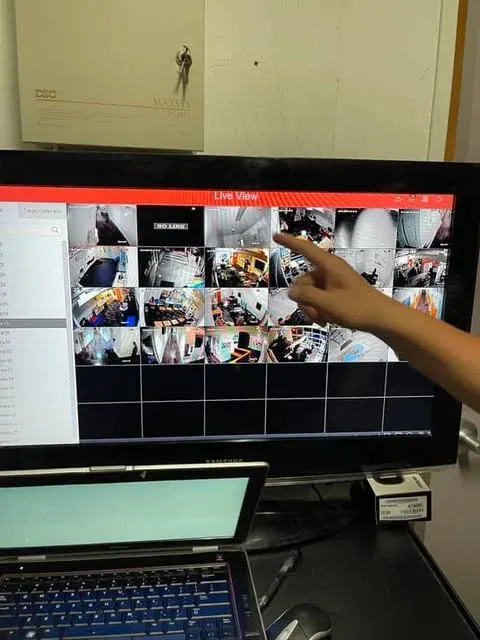
Hand touching a monitor that shows a multi-camera CCTV live view

What To Check Before You Call For Camera Repair

These quick checks help us arrive prepared.

  • Note which cameras fail

    Write down camera names or locations and when each failed.

  • Check the recorder screen

    Look for drive, disk, or network error messages.

  • Look for physical damage

    Check for cut cables, water, and broken mounts.

  • Review recent changes

    Router changes, power outages, and new equipment often explain sudden faults.

  • Find your login details

    Have recorder and camera credentials ready if you still have them.

  • Save key footage

    Export video you need before any drive work begins.

Standards and Safety Behind Our Repairs

We follow common standards so repairs stay safe and lasting.

IEEE 802.3PoE power

IEEE 802.3af, at, and bt define how much power each camera port can supply.

TIA-568Cabling

TIA-568 sets termination and testing practice for twisted-pair links.

NEC / NFPA 70Electrical safety

The National Electrical Code guides safe low-voltage and power work.

ONVIFCompatibility

ONVIF profiles help mixed-brand cameras and recorders work together.

NDAAEquipment rules

Some federal rules restrict certain camera brands. We flag affected devices.

Camera Repair Mistakes That Cost Time and Footage

Avoid these habits when your cameras act up.

Common Problems

  • Rebooting the recorder repeatedly with a failing drive
  • Replacing cameras before testing the cable
  • Leaving default passwords after a factory reset
  • Ignoring a recorder alarm for weeks
  • Mixing power adapters and PoE on the same camera

Better Practice

  • Export important video first, then power down safely
  • Test cable and PoE power before any camera swap
  • Set a unique password and record it in a safe place
  • Respond to drive and storage alerts right away
  • Use one clean power method per camera

More Security and Network Services

Pair this service with other systems that share the same cabling and network.

Security Camera Repair Across Los Angeles

We send technicians to business sites in these Southern California areas.

Pasadena, CA

Offices and retail sites with aging camera systems.

Glendale, CA

Storefronts and corporate buildings near central Glendale.

Century City, CA

High-rise suites that need quiet, fast service.

El Segundo, CA

Warehouses and industrial yards near the airport.

West Los Angeles, CA

Studios and offices with mixed legacy equipment.

Need service elsewhere in Southern California? See the full Los Angeles service area coverage, or read our low-voltage security and network guides.

Customer Reviews

What Customers Say About Our Work

These Google reviews come from customers of our Los Angeles low voltage services.

Posted on Google Google
Andrew Fernandez profile picture
Andrew Fernandez
Google star 1Google star 2Google star 3Google star 4Google star 5Trustindex verifies that the original source of the review is Google.
Arturo is a magician. Makes installations quick and easy. Quality work. Would definitely refer to a friend or family member who needs help with the wifi systems!
Posted on Google Google
ALEJANDRO PENALOZA profile picture
ALEJANDRO PENALOZA
Google star 1Google star 2Google star 3Google star 4Google star 5Trustindex verifies that the original source of the review is Google.
I had a great experience with Arturo the IT technician who helped me configure my cameras. He was very knowledgeable, professional, and patient throughout the entire process. He took the time to explain everything clearly and made sure the cameras were properly set up and working the way they should. I really appreciate his help and the excellent customer service. It’s always nice to work with someone who knows what they’re doing and genuinely takes the time to help. I would definitely recommend his services to anyone who needs IT or camera setup assistance!
Posted on Google Google
Claire Carrere profile picture
Claire Carrere
Google star 1Google star 2Google star 3Google star 4Google star 5Trustindex verifies that the original source of the review is Google.
Arturo was professional and presented a few options to extend our main house’s WiFi to the backyard and ADU. 3 Eero routers were set up, with one being mounted, to establish a strong connection and we are happy with the results. The install was done efficiently and aesthetics were taken into consideration when drilling for the internet cable.
Posted on Google Google
Marcio Lopez profile picture
Marcio Lopez
Google star 1Google star 2Google star 3Google star 4Google star 5Trustindex verifies that the original source of the review is Google.
Best of the best clean work, so professional 10-10
Posted on Google Google
Angelica Diaz profile picture
Angelica Diaz
Google star 1Google star 2Google star 3Google star 4Google star 5Trustindex verifies that the original source of the review is Google.
I’ve had a great experience with Arturo from Prime Network Cabling. He has installed two cameras for my salon so far, and I’m very happy with both the quality of the cameras and his service. One of the cameras has been especially helpful because I can see when customers arrive and even communicate with them when I have the salon closed temporarily or I’m away running an errand. Arturo is always available when I need help, very attentive, and takes the time to make sure everything is working properly. His prices are also very reasonable for the quality of the equipment and service he provides. Reliable, affordable, and great customer service. I definitely recommend Prime Network Cabling!
Posted on Google Google
Suhey Perez profile picture
Suhey Perez
Google star 1Google star 2Google star 3Google star 4Google star 5Trustindex verifies that the original source of the review is Google.
Highly recommend Prime Network Cabling! He is very reliable and has the best equipment!
Posted on Google Google
Marlen Marokyn profile picture
Marlen Marokyn
Google star 1Google star 2Google star 3Google star 4Google star 5Trustindex verifies that the original source of the review is Google.
Muy buen servicio 10 de 10 lo recomiendo muy buen servicio muy amable y muy respomsable con su trabajo y sobre todo professional the best in the area
Posted on Google Google
Alfredo Vargas profile picture
Alfredo Vargas
Google star 1Google star 2Google star 3Google star 4Google star 5Trustindex verifies that the original source of the review is Google.
I’m very happy with the service I received from Prime Network Cabling. I own a wholesale produce business in the Downtown Los Angeles Produce Market, specializing in high-quality avocados. They installed a security camera system for my business, and I’m very impressed with the picture quality. I’ve compared it with other systems, and the difference in quality is noticeable. I can also access my cameras remotely anytime, which gives me peace of mind and helps me keep an eye on my business even when I’m not there. The installation was very professional and clean. I especially liked that all the cables running outside were properly protected instead of being left exposed. Great quality, professional service, and a clean installation. I definitely recommend them.
Posted on Google Google
Eddie profile picture
Eddie
Google star 1Google star 2Google star 3Google star 4Google star 5Trustindex verifies that the original source of the review is Google.
They did our camera install and Arturo was great, walked us through how everything works. A couple weeks later one camera started beeping and he came back out to check it and fixed it. That kind of follow up after the job is done is rare these days. Would recommend to anyone looking to get cameras set up.
Posted on Google Google
Yaneli Salcido profile picture
Yaneli Salcido
Google star 1Google star 2Google star 3Google star 4Google star 5Trustindex verifies that the original source of the review is Google.
Great service! Arturo was awesome, very professional and explained how to work the camera system. A couple of months after the camera started making a beeping sound and he came by to inspect and fix the issue! If that’s not great customer service I don’t know what is. Definitely worth the money and be well recommend to everyone

Customer Reviews of Our Los Angeles Work

Security Camera Repair FAQs

Quick answers about camera and recorder problems.

Why is my security camera offline?

The most common causes are lost power, a bad cable, a failed switch port, or a changed network setting. We test each in order to find the real cause.

Can you repair cameras you did not install?

In most cases, yes. We work on many camera and recorder brands. We confirm the equipment during the diagnostic visit.

Is it better to repair or replace a camera?

Replace when the camera is very old, damaged beyond repair, or no longer gets security updates. Repair when the fault is in power, cable, or settings.

Can you recover footage from a failed recorder?

Sometimes. Results depend on the failure type. Stop using the recorder and contact us before any drive is reformatted.

Why does my recorder show no video from last week?

The drive may be full, failed, or set to the wrong recording mode. We check storage health and retention settings.

Do you reset forgotten camera passwords?

Yes, where the manufacturer allows it. We confirm ownership of the system first, then set secure new credentials.

Will repairs fix blurry night video?

Often. Dirty lenses, glare from nearby glass, and failed infrared lights are common causes, and each has a fix.

Diagnostic Visit Available

Cameras Down? Get Them Recording Again

Send us the camera names, error messages, and your site address. We will plan the fastest path back to full coverage.

Mon - Sat: 8:00 AM - 8:00 PM

Call (213) 221-0577 Free Site Survey